What is the Morning Meeting Brief?
Last updated: August 21, 2026
Quick Answer
The Morning Meeting Brief is a daily email from Pursuit that prepares you for the next 24 hours of meetings. Every weekday morning, if you have a connected calendar, you get a card for each upcoming meeting with the account attached, the guests Pursuit already knows, that account's Account Score and competitor presence, and researched Talking Points. Only meetings where at least one guest is already a contact in Pursuit appear, so every card is one you can act on. Turn it off any time in Settings → Integrations.
What This Is
Call prep used to mean digging through Radar, worksheets, and the account page the night before, or walking in cold. The Morning Meeting Brief does that work for you overnight and delivers it before your first meeting. Radar tells you which accounts are worth your time. The brief makes sure you are ready when you are in the room with one of them.
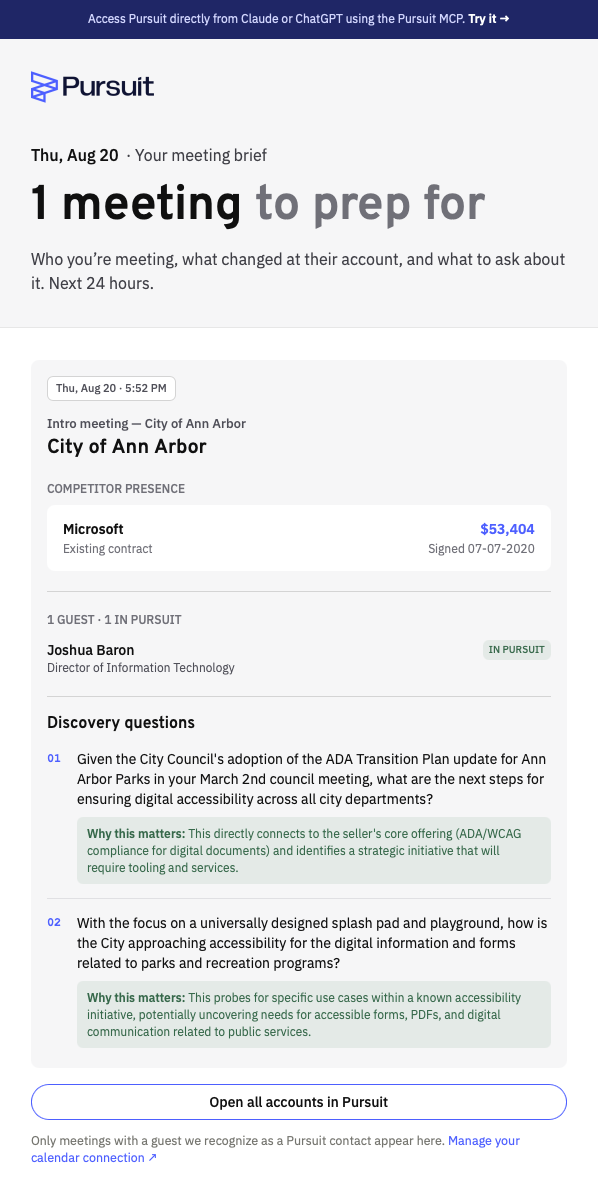
What Is on Each Meeting Card
Each meeting in the brief shows:
Time, title, and join link
The full guest list, with the guests Pursuit already knows flagged
The account those guests belong to
That account's Account Score
Competitor presence on the account
Talking Points: dated discovery questions researched from that account's own documents, including budgets, RFPs, meeting minutes, and news
Each talking point comes with a short line on why it matters to you, so you can tell at a glance whether to bring it into the conversation. A renewal call, for example, may surface that the competitor's contract expires in six weeks.
Which Meetings Appear
A meeting appears in your brief when it starts in the next 24 hours and at least one guest is already a contact in Pursuit. Meetings with no known contacts are left out. Both Google Calendar and Outlook are supported.
What It Doesn't Do
The brief does not include every meeting on your calendar. Internal meetings, personal events, and meetings with people who are not yet contacts in Pursuit are skipped by design. If a meeting you expected is missing, the guest is most likely not a contact on the account yet.
Note: The brief is on by default for everyone with a connected calendar. To stop receiving it, go to Settings → Integrations and turn off the Morning meeting brief switch on your email card.
Next Step
If you are not receiving the brief, connect your calendar: see How to Connect Your Calendar to Pursuit.