Understanding Usage Tracking
Last updated: September 10, 2026
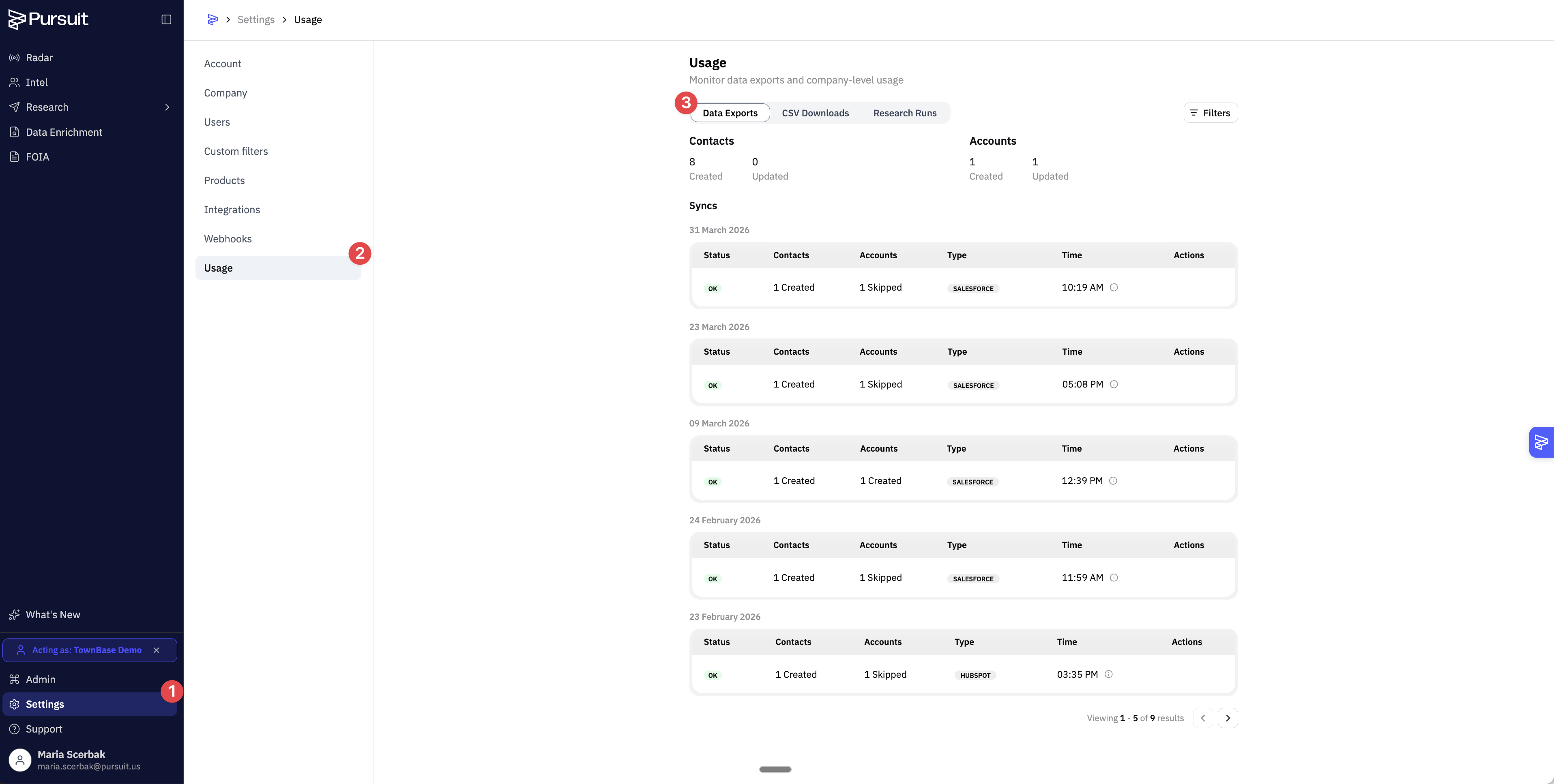
The Usage section in Settings gives admins visibility into data export and sync activity.
This article covers the sync and download logs in Usage. For credit consumption by Usage Type, see How to See where your Credits Went
Data Exports
Shows a log of all CRM sync activity — each time entities or contacts are pushed from Pursuit to your CRM. Each entry includes:
Date and time of the sync
Number of entities created and updated
Number of contacts created and updated
Sync status (completed, failed, in progress)
If a sync shows a failure status, check your integration settings.
CSV Downloads
An audit log of all CSV export activity across your workspace:
Name and email of the user
Source of the data (which module the export came from)
Number of records exported
Time of the download
How This Helps Admins
Onboarding tracking — Check if new users are actively syncing or exporting data.
Integration health — Monitor for regular sync failures.
Data governance — Ensure exports are within expected volumes and from authorized users.
Tips
Regular sync failures usually indicate an expired CRM connection. Re-authenticate under Settings → Integrations.
Enrichment activity (via Data Enrichment uploads) also appears in the CSV Downloads log. See 📄 Introduction to Data Enrichment