Removing accounts from your Radar territory
Last updated: June 22, 2026
What is it?
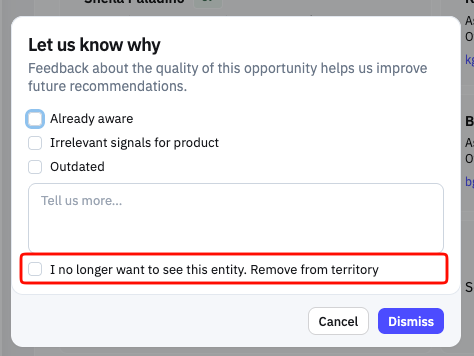
Triaging Radar used to be one-directional — you could work through signals, but trimming an account out of your territory meant a trip back to your profile settings. Now you can do it right where you spot it. The Dismiss button ( 👎 ) on an opportunity signal's detail view is now a split button, and its dropdown has a new Remove from Territory action.
Steps to remove an account from your Radar territory
Click on the Dismiss button ( 👎 ) on the signal
Click on
Remove from territorycheckbox and hit submit
How to verify it's removed
To verify that an account is removed:
On your Radar Inbox
Click on Edit Settings button (top right)
At the bottom of the Territory tab (2nd tab) you'll see the removed account(s) listed at the bottom in red.