Gathering Competitive Intelligence in Pursuit
Last updated: July 20, 2026
Overview
You have several complementary ways to gather competitive intelligence in Pursuit:
Radar for signals,
Research for structured insights across accounts,
Intel for account-by-account drill-downs, and
FOIA Requests for scoped primary-source documents
Each is a different lens on the same question, and they're built to work together. Start wherever your question is sharpest, then layer in the others.
What This Is
Competitive intelligence in Pursuit isn't a single feature. It's a set of lenses, each tuned to a different kind of question, from broad market signals down to specific contract documents.
Radar: Competitive Signals
What it's good for
Surfacing signals about a competitor, like competitive mentions, pricing references, and related buying signals across your market.
How to get started
In Radar, open Explore and wrap the competitor name in quotes to tighten the match:
"Competitor"(replace Competitor with the competitor's name)Broaden the lens with a descriptive query:
Competitor pricing documents, RFP responses, contracts(replace Competitor with the competitor's name)When the results look right, save it as a Saved Search so you can return to it.
Research: Structured Insights Across Accounts
What it's good for
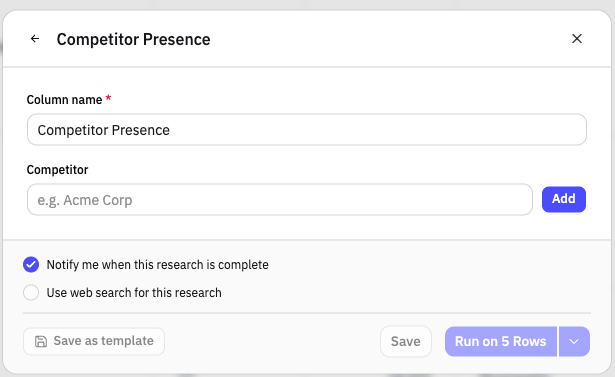
Seeing across your accounts at once. Research pulls from both primary sources (FOIA Requests and other documents Pursuit already gathers) and broader AI-powered searches, then returns detailed insights across accounts in a structured format.
How to get started:
Follow the walkthrough in 📄 Find Competitor Contracts
Intel: Account-by-Account Drill-Down
What it's good for
Exploring accounts one at a time to understand the lay of the land. You can drill into specifics like a competitor's purchase orders at a given account. It's the best starting point when you're first mapping a space, before you turn it into a Research worksheet.
How to get started
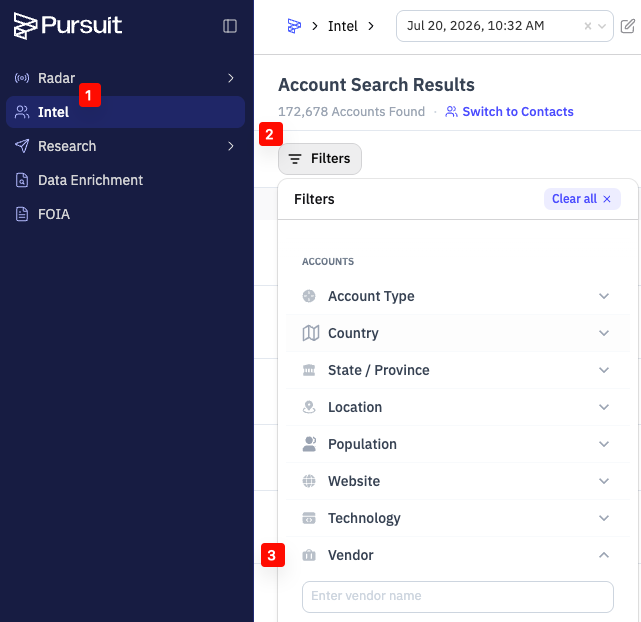
Go to Intel
Click on Filters (make sure you are using an account filter)
Under the Vendor filter, type the name of the competitor
remember to try both narrow and broad names as it may vary depending on how the account captures this information on its documents
Review the list of accounts with purchase orders ("POs") of the competitor
Click on the account name
Click on the Documents tab on the account page, and type the competitor name to see purchase order level (or other documents) related to the competitor
FOIA Requests: Scoped Primary-Source Documents
What it's good for
Going deeper on target accounts with primary-source public records. A FOIA Request (a public records request) can surface contracts and documents that aren't available any other way.
Learn More
If you'd like to scope a FOIA project for your target accounts, reach out to us, and we'll walk you through what it would look like.
How the Lenses Work Together
These aren't four separate tools you have to choose between. They're four views into the same competitive picture:
Start in Radar for the signals that tell you where to look.
Drill into Intel to understand a specific account, one at a time.
Scale up in Research to structure those insights across your whole account list.
Go deeper with FOIA when you need the underlying documents.
Use one, use all four, or move between them as your questions sharpen. Each lens strengthens the others.