How to Fix an Empty Radar Inbox
Last updated: September 2, 2026
Q: "Why isn't anything showing up in my inbox?"
When to Use This
Use this when you're logged into Pursuit and your Radar inbox shows no signals at all.
Steps
Open Radar → Inbox.
Click Edit Settings in the top right.
Select the territory profiles that match your accounts.
Click Find Opportunities.
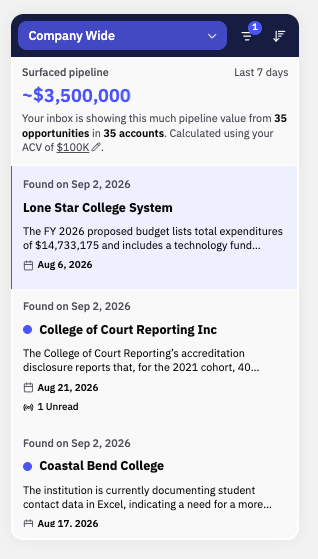
Look at the filter bar above your signal list.
Turn off the Saved filter if it's on.
Refresh the page.
What Success Looks Like
Signals matching your territory profiles appear in your Radar inbox.
Common Issues
Problem: The Inbox filter bar (sits on top of your inbox scroll) is set to Saved, and the list stays empty. Fix: The Saved filter only shows signals you've already saved. Turn it off to see your full feed.
Problem: Signals show up, but they don't match your accounts. Fix: This is a profile problem, not an empty-inbox problem. See "Why Signals Don't Match Your Territory."