How to Send Signal Talking Points to Each Contact in Your CRM
Last updated: November 6, 2026
When to Use This
Use this when you want every contact on a Signal to land in your CRM with Talking Points written for that person, ready to use as a personalization token in your HubSpot or Salesforce sequences.
Before You Start
You need Admin access in Pursuit
Your HubSpot or Salesforce CRM sync is set up
Create a text field on the contact record in your CRM, for example "Pursuit talking points." The Play writes to this field but can't create it
Steps
Go to Settings → Plays.
Click New Play, name it, and click Create play.
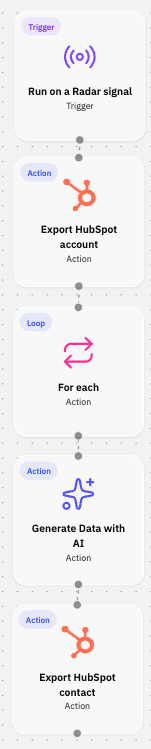
Drag the Run on Radar Signal trigger onto the canvas.
Add Export account to CRM. This creates or updates the account once, before any contacts are exported.
Add For each and set it to the Signal's contacts. Every step below it runs once per contact.
Add Generate Data with AI below the For each step.
Write the prompt using the current contact's name, title, and department, plus the Signal's description and why now. Set one output named talking_points.
Add Export contact to CRM.
Under extra fields, add your "Pursuit talking points" field and select the talking_points output.
Choose how the field is written. Select Override to keep only the latest Talking Points, or Append to keep a running history across Signals.
Click Save, then Activate.
What Success Looks Like
After the Play runs on a Signal, each contact on it is in your CRM, linked to the account, with Talking Points written for that person in your custom field. Your sequence template can use that field like first name.
Common Issues
Problem: Some contacts fail. Fix: Contacts without an email can't be exported to a CRM. The run shows how many failed, and the rest still export.
Problem: Export contact fails with "This play's trigger has no contact." Fix: Place Export contact to CRM below a For each over the Signal's contacts, or use the From Radar Signal Contact trigger instead.
Problem: You want one set of Talking Points for the whole account. Fix: Move Generate Data with AI above the For each. It runs once instead of once per contact, so it uses 1 credit instead of one per contact, but it can't use contact-specific details.
Problem: Some contacts already exist in your CRM. Fix: No action needed. Contacts with a Pursuit ID are updated, new contacts are created, and existing contacts without a Pursuit ID are matched by email, the same as a contact export from Intel.