Understanding Products in Pursuit
Last updated: July 28, 2026
Products tell Pursuit's AI what your company sells. You can best think of products not as individual SKUs offered by your company, but rather categories of the solutions your company is offering to the market. They directly control the kinds of opportunities Radar surfaces and how the platform generates insights.
What is a Product?
Each product has the following components:
Name — A label (e.g., "Fleet Management Software")
Visibility — Private to you, or shared with all workspace members
Description — A natural-language description telling the AI what to look for
See 📄 Creating and Managing Product Profiles for prompt-writing guidance
Signals - A free text field to provide specific multi-word statements that directly point Pursuit's AI to the types of procurement, need, and or sentiment specific signals you most care about surfacing. Weight these differently to boost better buying signals in Pursuit
Competitors - A space to provide a list of the competitors your company has specific to a given product or offering category
Keywords — Comma-separated tags that help catch relevant documents using different terminology.
How Products Drive Radar
The AI evaluates every government document against your product prompts and keywords. Matches become signal cards in your Radar feed. More specific prompts produce more targeted, relevant signals.
"Cloud-based fleet management for municipal transportation departments" produces much better results than "fleet software."
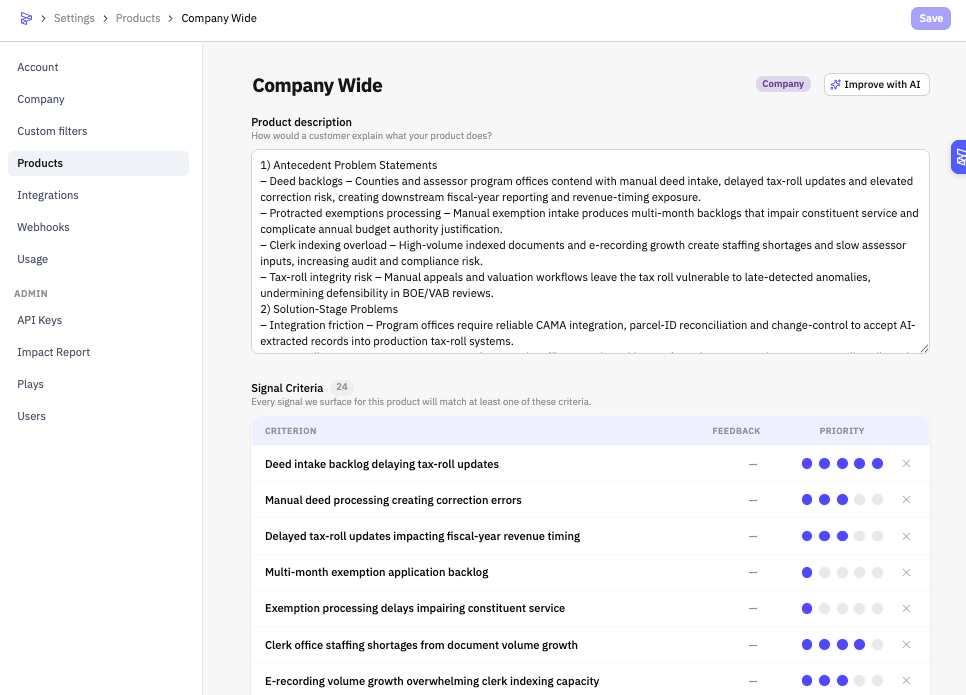
Company Wide
Most organizations choose to have a "company wide" product which serves as the broadest lens of signals.
For Users
Select which products to follow when setting up your Radar profile. See 📄 Your Personalized Feed (Inbox)
For Admins
Products are managed under Settings → Products.